


In today's digital world, we create more data than ever before. Photos, documents, videos, and important files fill up our devices quickly. Many people still rely on physical storage like USB drives or external hard disks, but there's a better way. Cloud storage offers automatic backups, accessibility from any device, enhanced security, and collaboration features that make it the clear first choice for modern data storage.
What Exactly Is Cloud Storage?
Let's start with the basics. Cloud storage simply means storing your files on the internet instead of on your personal computer or phone. Think of it like a virtual locker where you can keep all your important stuff. Companies like Google, Dropbox, and Microsoft provide these storage spaces, and you can access them from anywhere with an internet connection.
The "cloud" part might sound complicated, but it's really just a network of powerful computers called servers that are always connected to the internet. When you upload a file to cloud storage, it gets stored on these servers instead of just on your personal device.
Automatic Backups: Your Digital Safety Net
One of the biggest advantages of cloud storage is automatic backups. Remember that sinking feeling when your computer crashes and you realize you haven't backed up your important files? With cloud storage, that worry becomes a thing of the past.
Most cloud services offer automatic syncing. This means whenever you create or change a file on your device, the cloud service automatically saves a copy to your online storage. Whether it's photos from your vacation, important work documents, or your music collection, everything gets backed up without you having to remember to do it.
I learned this lesson the hard way when my laptop suddenly stopped working last year. I had been working on an important project for weeks and hadn't backed up my files. Luckily, I had set up cloud storage a month earlier, and all my work was safely stored online. I simply logged into my account from another computer and continued right where I left off.
Access Your Files From Anywhere
How many times have you needed a file but left it on your home computer while you're at work or traveling? With cloud storage, your files are available wherever you have internet access. You can view, edit, and share your documents from your phone, tablet, laptop, or any computer.
This flexibility has completely changed how we work and live. Students can start an assignment on their laptop at home, continue working on it from their phone during their commute, and make final edits on a library computer. Business professionals can access important presentations from any location. Parents can share family photos instantly with relatives across the country.
The convenience of having all your important files available at your fingertips cannot be overstated. It eliminates the need to carry physical storage devices or worry about which device has the latest version of a file.
Enhanced Security: Better Than You Think
Many people worry about cloud security, thinking their files might be safer on their personal devices. The truth is, for most people, cloud storage is actually more secure than local storage.
Consider what happens if your laptop gets stolen or your hard drive fails. If you only have local copies, your files could be gone forever. Cloud storage providers use advanced security measures including:
- Encryption: Your files are scrambled into unreadable code during transfer and storage
- Redundant storage: Your data is copied to multiple locations so if one server fails, your files are still safe
- Professional security teams: Cloud companies have experts working around the clock to protect against threats
- Automatic updates: Security improvements are applied automatically without any action required from you
Of course, you still need to use strong passwords and enable two-factor authentication when available. But overall, the security provided by major cloud storage services is far beyond what most individuals can implement on their personal devices.
Easy Collaboration and File Sharing
Remember the days of emailing files back and forth, creating multiple versions that quickly became confusing? Cloud storage has revolutionized how we collaborate.
With cloud storage, multiple people can work on the same document simultaneously. You can see changes in real-time, leave comments for collaborators, and maintain a single version of the truth. This is incredibly useful for:
- Work projects with team members in different locations
- School group assignments where everyone needs to contribute
- Family planning for events like vacations or reunions
- Creative projects where multiple people need to provide input
Sharing files is also much simpler. Instead of attaching large files to emails (which often get blocked by size limits), you can simply generate a shareable link. You can control whether recipients can just view the file or also edit it, and you can set expiration dates for shared links if needed.
Cost-Effective Storage Solution
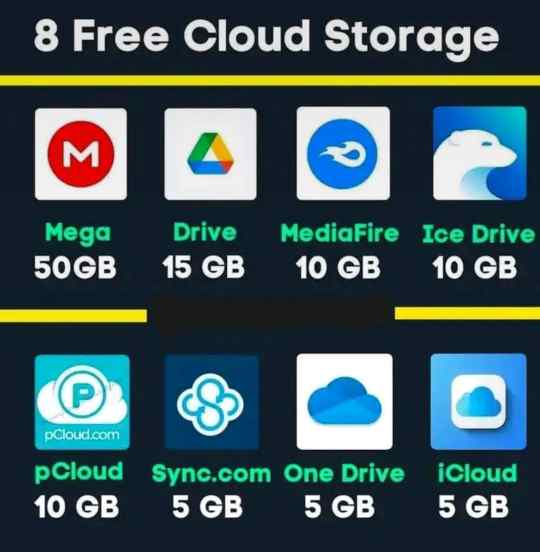
Many people are surprised to learn that cloud storage is often more affordable than physical storage options. Most providers offer a generous amount of free storage—anywhere from 5GB to 15GB—which is enough for many people's basic needs.
If you need more space, paid plans are surprisingly inexpensive. For less than the cost of a couple of cups of coffee per month, you can get 100GB to 2TB of storage. Compare this to the cost of buying multiple external hard drives, which can fail and need replacement.
Cloud storage also eliminates hidden costs like:
- Replacing failed hard drives
- Buying new storage devices as your needs grow
- The time spent manually backing up files
- Data recovery services when devices fail
Space Saving and Organization
Cloud storage helps declutter your physical space and your digital life. No more stacks of external hard drives or drawers full of USB sticks. All your files are neatly organized in one place that you can access from any device.
Most cloud services offer powerful search functions that make finding files quick and easy. You can search by filename, content within documents, or even by date. Many services also automatically organize your photos by people, places, or things recognized in the images.
The organizational benefits extend beyond just finding files. You can create shared folders for different projects or aspects of your life, set up automatic sorting rules, and maintain a clean, organized digital filing system that works across all your devices.
Disaster Recovery: Peace of Mind
Natural disasters, theft, or accidents can destroy physical storage devices. Floods, fires, or even simple spills can wipe out years of precious memories and important documents stored on local devices.
Cloud storage provides protection against these physical threats. Since your files are stored in secure data centers—often in multiple geographical locations—they're safe from local disasters. Even if your home or office experiences a catastrophic event, your digital life remains intact in the cloud.
This disaster recovery aspect is particularly valuable for business owners, but it's equally important for individuals. Family photos, important documents, and personal projects represent significant emotional and practical value that's worth protecting.
Environmentally Friendly Choice
While not often discussed, cloud storage is generally more environmentally friendly than everyone maintaining their own physical storage devices. Data centers are designed for energy efficiency, and by sharing resources among many users, we reduce the overall environmental impact.
Consider the manufacturing, shipping, and eventual disposal of physical storage devices. Then think about the electricity needed to power and cool these devices in millions of individual homes and offices. Cloud storage consolidates this infrastructure into optimized facilities that can achieve much higher efficiency.
Getting Started with Cloud Storage
If you're new to cloud storage, getting started is easier than you might think. Most services offer simple setup processes that guide you through the initial steps. Here's a basic approach to begin:
- Choose a reputable cloud storage provider (Google Drive, Dropbox, or Microsoft OneDrive are good starting points)
- Create an account—most offer free tiers to get started
- Install the desktop and mobile apps for seamless integration
- Start by uploading your most important files and folders
- Set up automatic backup for your photos and documents
- Explore sharing and collaboration features as you become comfortable
You don't need to move everything to the cloud at once. Start with your most important files and gradually expand as you become more comfortable with the technology.
Common Concerns Addressed
I often hear people express concerns about cloud storage. Let me address the most common ones:
"What if the internet goes down?" Most cloud services allow you to mark files for offline access. These files are stored locally on your device and automatically sync when you're back online.
"I'm worried about privacy." Reputable cloud providers have strict privacy policies and don't scan the content of your files. You can also encrypt sensitive files before uploading them for an extra layer of privacy.
"It seems complicated to set up." Modern cloud services are designed for ease of use. The setup process is typically straightforward, and once configured, everything works automatically in the background.
The Future Is in the Cloud
As we move further into the digital age, cloud storage is becoming the standard rather than the exception. New technologies like 5G will make accessing cloud storage even faster and more reliable. Artificial intelligence is being integrated to help organize and search your files more intelligently.
The trend is clear: storing files locally on physical devices is becoming outdated. Just as we transitioned from film cameras to digital, and from landlines to mobile phones, we're now transitioning from local storage to cloud storage.
Making cloud storage your first choice isn't just about keeping up with technology—it's about embracing a more convenient, secure, and efficient way to manage your digital life. The benefits of automatic backups, anywhere access, enhanced security, and easy collaboration far outweigh any minor learning curve.
Your files represent your work, your memories, and important aspects of your life. Don't leave them vulnerable to device failures, loss, or damage. Take the step today to move your important files to the cloud and experience the peace of mind that comes with knowing your digital life is protected and accessible whenever you need it.